
How do I watch via Chromecast on my desktop?
If you have a Chromecast device, you can use that in conjunction with the Google Chrome desktop browser to watch content on your TV.
Note: At this time, we expect most Chromecast devices built into TVs to work but cannot guarantee that for each model. We cannot troubleshoot any issues that may arise in such cases.
Additionally, it is not possible to Chromecast via a mobile web browser (including Chrome) on iOS.
From your desktop Chrome browser (computer)
There are two ways to Chromecast a video to your TV screen: cast the entire browser window or cast from the video player. Note that both methods require your computer and your Chromecast device to be connected to the same local network.
Cast the browser tab
By casting your browser tab, you would also be able to control the player via the browser just as you would if you were watching on your computer. When selecting this method, only the selected tab will cast; while you can navigate to other tabs on your computer, these will not be cast to the TV.
Additionally, if you navigate away from the player within the selected tab (i.e. load a different website), the video will no longer cast to your TV.
- On the video page, open the Chrome menu in the upper right corner of the window (or open the View menu at the top) and select Cast.
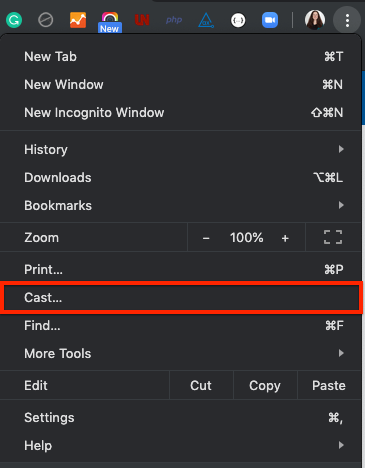
- Select your Chromecast source and your Chromecast destination. Chromecast will then be connected and the video will display on your TV screen.

- To pause, fast-forward, or rewind, use the player controls within the browser tab.
- To disconnect from Chromecast, click the blue Stop icon next to your casting destination in the menu.




Cast the player
When casting via this method, you can navigate away from the tab with the video playing and the video will continue to play on the TV screen. However, doing so would disconnect the player controls from the video on the screen and you would lose the ability to pause or scrub via the player options on the screen. To regain these controls, you would need to reset the Chromecast connection (i.e. stop casting and start again).
On the video page, hover the cursor over the player so that the player controls appear. If you see the Chromecast icon in the bottom right corner, you can cast the player via this method.

- Click the Chromecast button on the player to open the Cast tab. Select your Chromecast source and your Chromecast destination. Chromecast will then be connected and the video will start playing on your TV.
- To pause, fast forward, or rewind the video, use the player controls on your desktop screen.
- To disconnect from Chromecast, click the Chromecast icon within the player, then select the blue Stop icon next to the casting destination.